
Showing posts with label Technology. Show all posts

Thursday, January 17, 2019

Whatsapp Introduced Two New Features For Android And IOS Users,See Details

Whatsapp Group Call Button,Whatsapp Dictation Features

Whatsapp has introduced two new features whatsapp group call button shortcut and whatsapp dictation feature for android and ios users.Whatsapp user getting a new update of dedicated whatsapp call button in group chats.Whatsapp Group Call Button was already roll out for Apple iPhone users. The new Whatsapp group call feature works similar to Standard Whatsapp Calling - All the members of the group get a call and video call button.In whatsapp dictation features user will send message without typing,user will dictate the message using mic and it will automatically type your message in whatsapp type box and you will just click send button manually for sending the message.


Whatsapp Group Call Button Feature:-

Whatsapp Group Call Button Shortcut Features,Group Call Button

WhatsApp has rolled out the whatsapp group voice and video calling feature in 2018.In which user will add different people one by one to make a group calls. Now a new update has been released for the WhatsApp Android app. Under this, a separate button has been provided for group calls.In this feature, users will be able to add participants to group calls at a time.Before this feature was only available for iOS users. But now it has also been rollout for Android users.

This information of WhatsApp (v2.19.9) is first given on WABetaInfo.Before this users will had to add one by one user for group call.After getting a new group call button, it will be easier to make group video or voice calls.To place a call user will click on the phone icon at the top right side and then after clicking the call button the slide-out tray will open where all your contact cards will be present. From here you can select whoever you want to be a part of the group voice or video call. To use this feature, you must download the latest stable version of WhatsApp Android.

Whatsapp Dictation Features:-
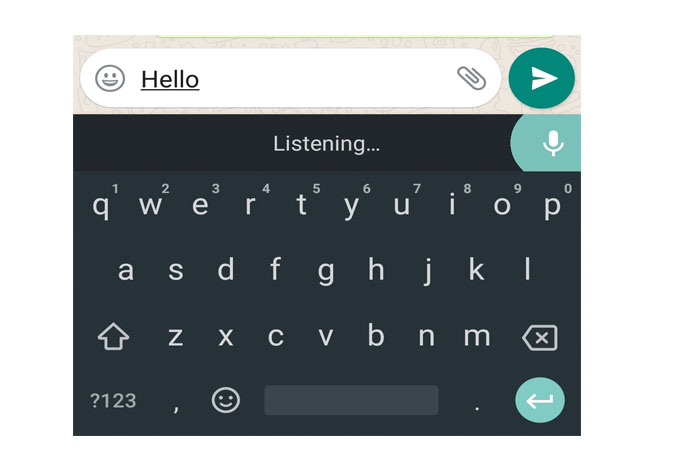
Whatsapp Dictation Features,Voice Message

If you want to send a message to someone on WhatsApp but you feel too lazy to write a message.The company has introduced mic features called whatsapp dictation features for android and ios user, In which user will dictate the message using the mic and it will automatically type your message in whatsapp type box.User will only press the send button to sending the message to your contact.

This type of feature available for Smart Voice Assistant like Google Assistant and Siri. Now this feature has been in-built in WhatsApp and through this, users can send messages by dictate through the mic icon given on the keyboard.

To use dictation feature First open your WhatsApp then after go to your contact chat window where you want to send the message.Then Tap the Type box to send the message.On the keyboard, you will see a mic icon Tap on it and speak whatever message you want to send,it will be automatically typed.After the message is typed, you can only click the Send button.The message will send to your contact.To use this feature, you must download the latest stable version of WhatsApp.

Also Read This:-
LG V40 ThinQ With Tripal Camera Setup Will Launch On 20 January In India,Amazon Exclusive,See Details.

Friday, November 16, 2018

Jio GigaFibre Broadband Service Will Launch In These Cities First,See Details

Jio Gigafibre Launch

Jio GigaFiber broadband announce in the annual general meeting of Reliance Industries in august this year. But the Jio GigaFibre FTTH network has not been official launch for the public yet, and it is still in beta phase.Now the news is coming that the names of those cities have announce, where the service will be started first.The company had already started registration for Jio Broadband in August on jio.com and my jio app.

According to news it has also been revealed that 100 GB data will be given every month at 100Mbps speed with the new Jio GigaFiber connection. Under the Jio GigaFiber preview offer, users will have to pay a security amount of Rs 4,500 for Jio GigaFiber and Jio GigaFibre Router.

Jio Gigafibre Broadband Service First Launch In These Cities:-

These cities include Bangalore, Ranchi, Pune, Indore, Thane, Bhopal, Lucknow, Kanpur, Patna, Allahabad, Raipur, Nagpur, Ghaziabad, Ludhiana, Madurai, Nashik, Faridabad, Coimbatore, Guwahati, Agra, Meerut, Rajkot, Srinagar, Amritsar , Chandigarh, Jodhpur, Kota and Solapur.There is no any official statement of Reliance Jio about Jio Gigafibre Broadband Service coming to these cities.

Jio Giga Fiber Broadband Plans Details:-

A Jio Gigab fiber plan will start from  Rs 500 to Rs 1500 .The Jio GigaFiber broadband plans is cheaper than other telecom companies' plans.
  1.  In 500 rupees  plan, the customer will get the speed of 50 Mbps. its validity will be 30 days. Apart from this, 300 GB data will be given
  2.  In 750 rupee Jio Giga fiber plan. In this plan user can get 450 GB data for 30 days.
  3.  In  Rs 999 Jio Giga Fiber Plan , user can get 600 GB data for 30 days.
  4.  In Rs. 1299 of Geo Giga Fiber,User can get 750 GB data  for 30 days.
Apart from this, the price of  Rs 1500 user will get  150 Gbps and 900 GB for 30 days.


Read Also:-1.Xiaomi Redmi Note 6 Pro Set To Launch In India On November 22,See        Details
                     2.-Samsung Galaxy A9 (2018) Launch In India On 20 November,See Details

Tuesday, November 6, 2018

Xiaomi Redmi 6A 32GB Storage Varient Is Now Available On Open Sale,See Details


Xiaomi announced thats its budget smartphone redmi 6A (32Gb) varient are now available in open sale from today.Now Xiaomi Redmi 6A handsets can be sell at the open cell on Mi.com and Amaon.in for Rs 6,999. The main highlighting features of this phone is 18: 9 aspect ratios displayed , AI-powered face unlock feature, dual 4G VoLTE capability. Redmi India officially announced this information on its Twitter account.Smartphones will be available in Black, Blue, Gold and Rose Gold Color.

Xiaomi Redmi 6A Specifications:-


Shaomi Redmi 6A has a  5.45 inch HD + (720x1440 pixels) display. The screen is of 18: 9 aspect ratio. Redmi 6A is powered by Quad-Core MediaTek Helio A22 Chipset and has 2 GB RAM This Dual VOLTE Dual Standby handset will run on the MUI 9.6, which is based on the Android 8.1 Oreo. In the launch event, the company guarantees to receive future MiUI 10 updates in this phone. 

Talking about the camera redmi 6A has a 13-megapixel rear sensor, which came with F-2.2 aperture, PDAF. The front has a 5 megapixel sensor for selfie,which can be used in portrait mode selfie and video calling. There are two options for inbuilt storage - 16 GB and 32 GB storage can beexpandable upto 256 GB via microSD card in both variants the storage.The phone has 3000 mAh battery. In connectivity, the Redmi 6A has 4G VoLTE, Bluetooth, Wi-Fi, A-GPS, Micro-USB.

Xiaomi Redmi 6A Price:-

The price of xiaomi redmi 6A starts at Rs 5,999 for 2 GB RAM and 16GB storage variants will be sold. The second variant of Xiaomi Redmi 6A is 2 GB RAM and 32 GB of storage price for Rs. 6,999. It will be available on amazon.in and mi.com

Read Also:-Samsung Foldable Smartphone Expected To Launch In This Week,See Details

Friday, October 26, 2018

5 Amazing Websites 2021 On The Internet, See Details

amazing websites 2021

There is lot of websites are available on the internet we only know few websites,but not all websites are useful for everyone, but there is many amazing website is available on Internet,If you are a internet user, then you should know about all these amazing websites so that you can become a smart user on the internet.So here are the 5 amazing websites 2021 you must vist it.


1.Algorithmia:-

5 amazing websites 2018

Algorithmia are in  first in our amazing website 2021 list.We have many such photos which are Black & White. Sometimes it happens that we want to make those photo color photos, but if we want to colorize Black and White photos with Photoshop or some other photo editor then much more It will take time. If you want to colorize your Black & White photo in a few seconds, then with the help of this algorithma you can easily convert black & white photos into colour photo.


2.Norse Attack Map:-

5 amazing websites 2018


Norse Map are in Second in our amazing website 2021 list .If you want to see live hacking attack so here are the norse attack map where you can see different live hacking attacks from different countries.This website is very amazing you must vist it.


3.Internet Map:-

5 amazing websites 2018

Internet Map are third in our amazing website 2019 list. In internet map you can see all websites into map form or in colourfull dots.It is the one of best website available on internet you must onces vist it.


4.Internet In Real Time :-

5 amazing websites 2018

 Internet in real time  Are fourth in our amazing webite 2021 list. If you wants see real time whats happen on intenet so real time on internet website is help for you to see on all other websites and social websites, You must try it.

5.EssayTyper:-

5 amazing websites 2018

Essay Typer Are Firth and last In our amazing website 2021 list. If you want write a essay or any paragraph but dont like to type so essay typer will help to write a eassy in few minute.You just write a topic on essay typer then press any key then it can automatically type essay related to your topics.This website is very usefull for school students.You must onces vist it.


Monday, October 15, 2018

Amazing Google Tricks You Should Try It ,See Details

Google amazing Tips and Tricks


When we have to search something then we search directly search on google, but do you know google has some amazing tricks and secret.There are so many amazing tricks and games in google only few peoples know this tricks.So here are the best tricks and tricks of google you should try it.

Google 5 Amazing Tricks:-

1.Google Gravity:-


Gravity affects all things, you all know it, but have you ever thought about how Gravity will affect Google. If you want to see, just type Google Gravity in the search box and click on I'm feeling lucky button and see whats happening.


2.Google Snake:-


This trick is very interesting if you are getting bore then search the Google snake type in the search box. After that you can play online snake game on Google.


3.Pac-Pac Game:-


Pac-man is very popular Game You might have played this in your phone but if you want to play this game online on Google then search by typing Pac-man in the search box.Now you will see Pac-man Game click on it and enjoy online Pac-man online.

4.Do a Barrer roll:-


If you want to see Google's page rotating 360 degree,then just type do a barrel roll in the search box and press the enter button and see the magic.

5.Google Underwater:-


 If you want to see Google's logo floating on water then type Google underwater in search bar and  press the I'm feeling lucky button.
                     Top 5 Amazing websites,see details.